On the morning of October 29, an engineer named Ridham Parmar opened GitHub and found that 99 branches across 9 repositories had been force-pushed from his account. The pushes happened between 00:33 and 00:49, while he was asleep, and every commit kept his name, his message, and its original date. When did you last check whether your own account pushed something you never pushed?
The worm is called PolinRider. It hit a team called Improwised Technologies, and they wrote up the whole incident on October 31. This piece exists because they published their timeline instead of burying it, so the rest of us can learn from the order in which things happened.
The 28-day timeline
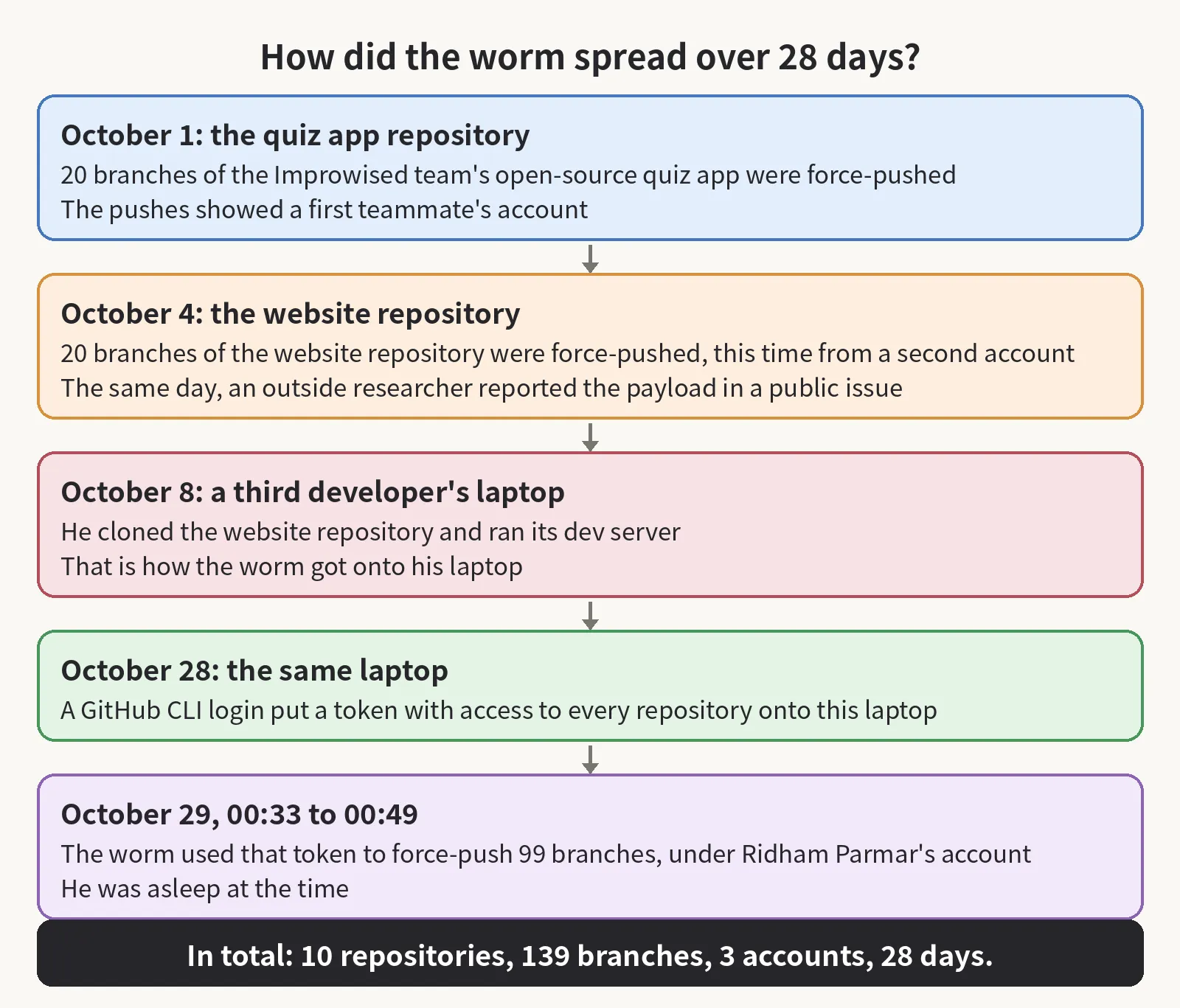
It started on October 1, when 20 branches of their open-source quiz app were force-pushed from a teammate’s account. On October 4, a second account force-pushed 20 branches of their website repository. That same day, an outside researcher reported the payload in a public issue, because the company’s security mailbox would not accept his email. He then opened a pull request to remove the payload, and the pull request was closed without merging.
On October 8, a third developer cloned the website repository and ran its dev server, and the worm installed itself on his laptop that way. On October 28, a GitHub CLI login put a token with full repository access on that laptop. The next night, the worm used that token for the 99-branch push. In total, 139 branches in 10 repositories were force-pushed from 3 developer accounts, and the worm had been in their repositories for 28 days. As far as the team can tell, no customer system or data was affected.
What the worm leaves behind
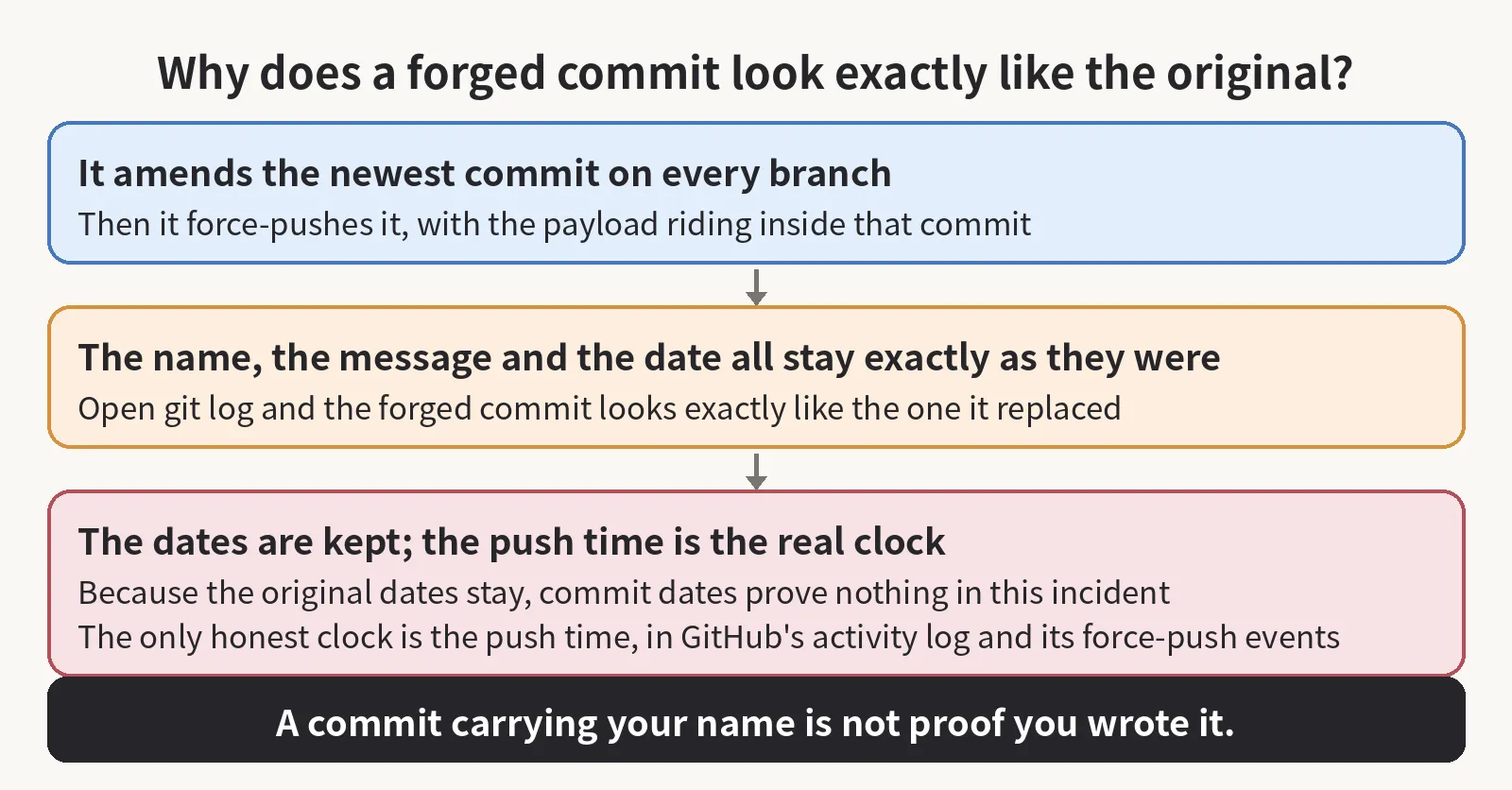
139 branches sounds like the story, but the count is the least interesting number in it. What stayed with me after reading their write-up is how little evidence the worm leaves behind. It amends the newest commit on every branch it can push to, and it keeps the commit message, the author, and the date, so when you open git log, the forged commit looks exactly like the one it replaced. Commit dates prove nothing here, because the worm keeps the originals. The only honest clock is the server’s push time, which lives in GitHub’s activity log and in its force-push events.
Hiding place and command channel
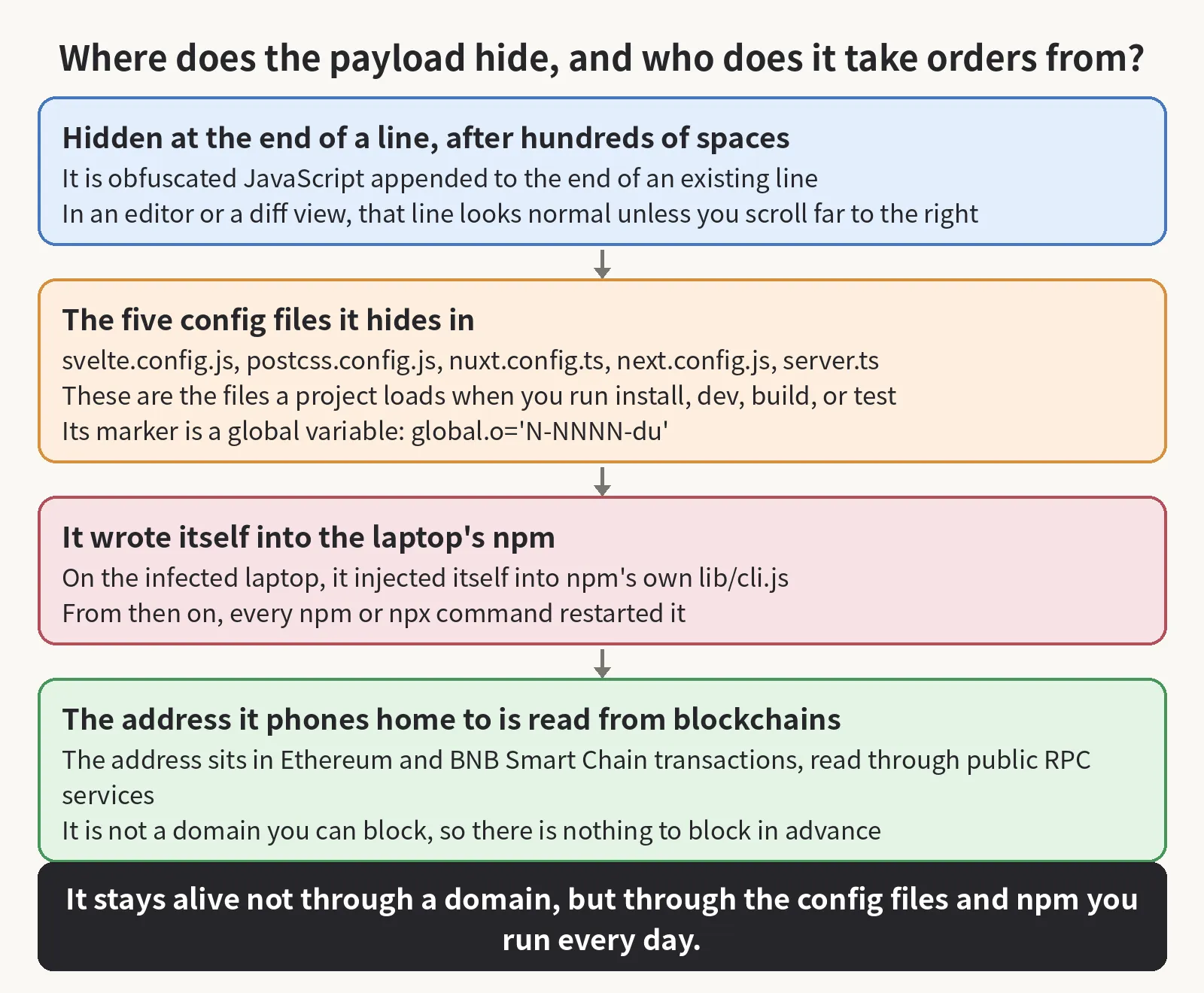
The payload hides in plain sight. It is obfuscated JavaScript appended to the end of an existing line, after hundreds of spaces, and it sits in the config files that a JavaScript project loads when you run install, dev, build, or test: svelte.config.js, postcss.config.js, nuxt.config.ts, next.config.js, and server.ts. In an editor or a diff view, that line looks normal unless you scroll far to the right. The address of the server it phones home to is not a domain you can block either, because the payload reads the address from Ethereum and BNB Smart Chain transactions, through public RPC services, so there is no domain to block in advance.
The copy inside npm
The payload also rides the tool you run a hundred times a day. On one developer’s laptop, it injected itself into npm’s own lib/cli.js, and from then on, every npm or npx command restarted it, including a tool that started automatically. That is why the team’s first instruction to everyone was to stop running npm entirely.
Build machines and pipeline secrets
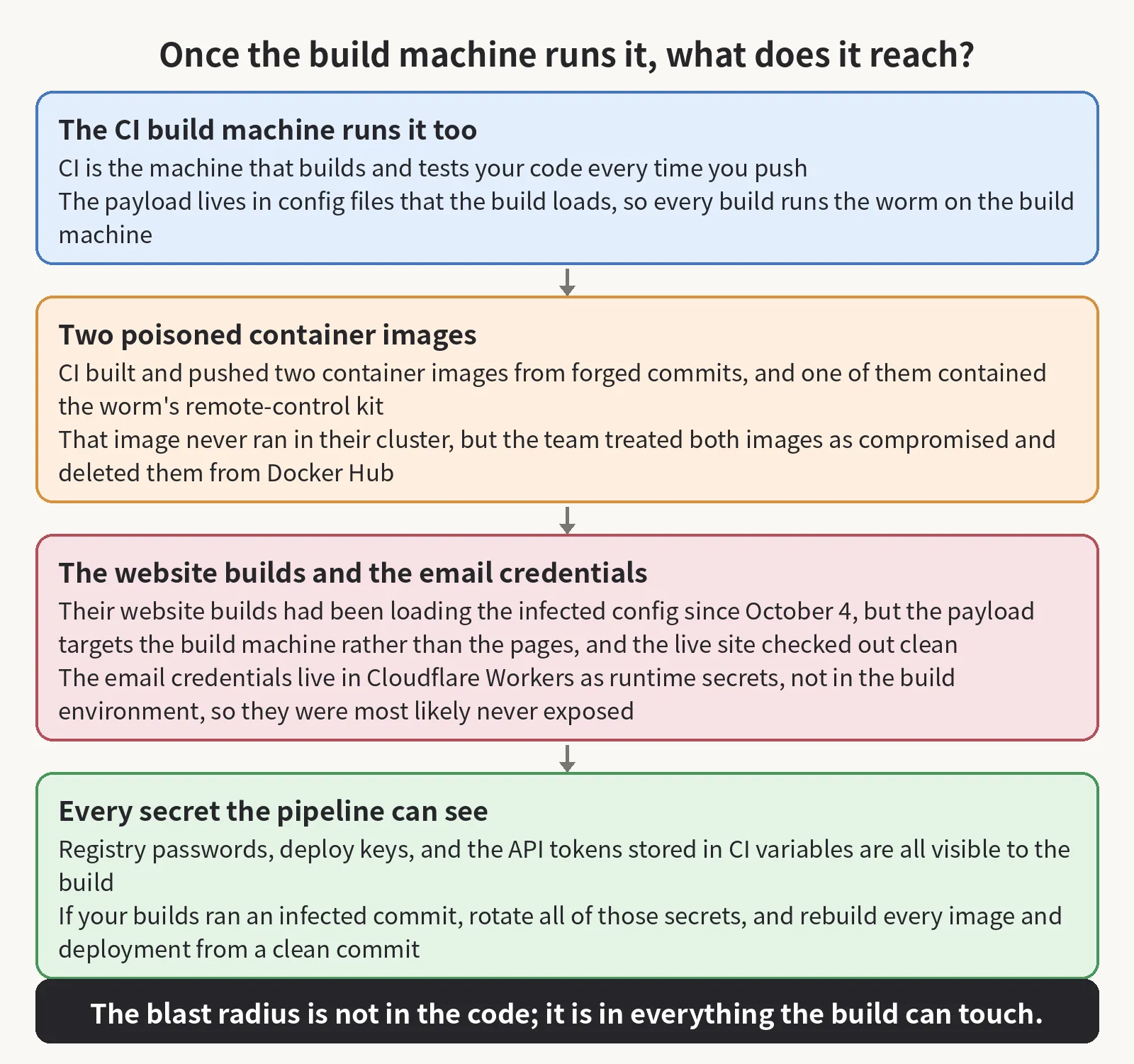
Your build machine runs the payload too, and that is the part most teams never think about. The payload lives in config files that the build loads, so every CI run and every static site build of an infected commit runs the worm on the build machine. CI is the machine that builds and tests your code every time you push. In this incident, CI built and pushed two container images from forged commits, and one of those images contained the worm’s remote-control kit. That image never ran in their cluster, because the container only serves static files through nginx, but the team still treated both images as compromised and deleted them from Docker Hub.
Their website builds had been loading the infected config since October 4. The payload is built to target the build machine rather than the pages, and the team’s check of the live site found nothing in it. The email credentials were most likely never exposed, because they live in Cloudflare Workers as runtime secrets rather than in the build environment.
So the blast radius is bigger than the code itself, because the worm rides the build, and the build can see every secret your pipeline holds: registry passwords, deploy keys, and the API tokens stored in CI variables. If your builds ran an infected commit, then you should rotate all of those secrets, and you should rebuild every image and deployment from a clean commit.
The chances to catch it early
The team had three chances to catch it earlier, and they wrote them down honestly. On October 4, the outside researcher handed them most of what they only pieced together on October 29, 25 days early, in a public issue, and the pull request that would have removed the payload was closed the same day. On October 13, a dependency-upgrade pull request removed the payload from one branch of one project, and nobody asked how the code got there, which account pushed it, or which other branches had it. The team’s own line on that fix is that it bought them 16 days. If you find injected code, then you should treat it as an incident rather than a bug: find the account that pushed it, and then find everywhere else that account could push.
The first rule
That is the first rule I would set for any team, because a commit that carries your name is not proof that you wrote it: the worm keeps the name, the message, and the date. A clean main branch is no evidence about the other branches either, because the worm touches every branch it can push to. The worm stayed in their repositories for 28 days because the October 4 warning was never acted on, and because the one fix that did happen, on October 13, stopped at a single branch of a single project. Nobody followed the account.
Three checks to run yourself
That is where I would start on my own repos, too. First, check the activity log rather than the commit log: look for force-pushes that nobody on the team remembers, and judge them by push time, because the commit dates are forged. Second, search for the long lines: look in config files for code hiding after 150 or more spaces at the end of a line, and for the payload’s marker, a global variable set to an ID in the form global.o=‘N-NNNN-du’. Third, watch the processes: a detached node -e process that keeps running after an npm command finishes, and CI runs that start failing after pushes you do not recognize. The team published a read-only scanner for this, and it checks every branch, tag, and stash on a machine, plus the processes and the network connections, without running any of the code it scans.
The boring fixes
The changes that would have stopped it on day one are the boring ones, which is why they never get done. Block force-pushes on default and release branches. Alert on force-push events from the audit log, so that a mass push pages someone that night instead of waiting for a morning. Require signed commits on protected branches. Replace long-lived tokens and SSH keys that can push to everything with short-lived, fine-grained tokens. Run untrusted code in a disposable virtual machine and never on a work machine, and that includes take-home tests and repos that someone asked you to just have a look at. If a machine is infected, then you should disconnect it, rotate every credential it held from a different, clean machine, and reimage it, instead of cleaning it in place.
Knowing who ran it helps investigators, but it does not help you, because the method works for anyone who copies it. The worm is attributed to North Korea by the OpenSourceMalware team, and it is linked to the “Contagious Interview” fake job-interview campaigns. After 24 years of shipping software, the part of this incident I keep coming back to is plain: every force-push was recorded in GitHub’s activity log from the first night, and for 28 days nobody looked at that log. An alert on those events would have paged someone on October 1.
If this got you to open your own activity log, consider subscribing to this blog or bookmarking it. I keep sharing plain-language pieces on AI, security, and open source, and the next one will be another check you can run yourself.
Sources: the Improwised incident write-up https://www.improwised.com/blog/polinrider-malware-infection-cleanup/ · the scanner https://github.com/Improwised/polinrider-scanner