On October 31, a developer named MeT posted that his friend had received a phone call from local police telling him to uninstall the apps X and Telegram from his phone. MeT investigated the phone because of that call, and the investigation led him to a system component that had shipped with the phone. The component bundles a report of which apps the phone used in the past 24 hours, and for how long, and sends that report to China Unicom’s servers.
Do you keep Telegram or a proxy tool on your main phone? If you do, then have you ever scrolled through that phone’s full list of system apps, top to bottom?
MeT’s friend’s phone was a Xiaomi 14 running HyperOS 3, and the SIM in it was a China Mobile card. The phone had already been rooted — rooted meaning its system had been opened up to full administrator access. After rooting it, MeT pulled the suspicious components off the device with adb, a command-line tool run from a computer, and worked through the code with the help of GPT, an AI assistant. He ended up identifying two components that send app information from the phone to outside servers.
One is Xiaomi’s own system security component, which sends the list of third-party apps to Xiaomi’s anti-fraud servers. The other is called SystemHelper. It reports more kinds of information than the security component does, and its recipient is China Unicom.
Two components were found, and online discussion quickly mixed them together. The “records a few seconds of your screen, over and over” behavior belongs to Xiaomi’s security component, not to SystemHelper. This piece is about SystemHelper only. It is the only one of the two components that has been taken apart completely, with its fields counted one by one out of the code, so what it reports is known in full. Knowing the full list of fields is what makes it possible to show what a VPN can stop and what it cannot stop.
On November 5, a thread on the V2EX forum pulled the whole affair together under the title “Can we have a little privacy,” and it drew 171 replies. The thread covered what happened, but it left two questions unanswered: whether turning on a VPN stops any of this, and what kind of profile of a person can be assembled from this dataset.
SystemHelper’s owner and destination
SystemHelper is not Xiaomi’s code. It is China Unicom’s device management client, the kind of component carriers call a DM client. China Unicom’s own Android DM adaptation guide lists the exact preinstall path for it, and the guide even instructs vendors not to block it from starting at boot.
On the phone it sits in the privileged system directory and carries the platform signature, so the permissions an ordinary app cannot get are granted to it at the factory. The platform signature means it is signed with the phone maker’s platform key, and Android therefore treats it at the signature-privilege level. It has no icon on the home screen, and it does not show up in the normal app list. Without root, you can neither remove it nor pull it off the device for analysis.
The server address it reports to is written into the code, and the default value is a China Unicom device management address reached over plain HTTP. The payload body does pass through an application-layer encryption step in the code before it is sent. A plaintext address and a processed payload body are two separate facts. Whether anyone watching the data in transit can read what is being sent is another question, and nobody can say for sure. The last section of this piece takes that question up and separates what is confirmed from what is not.
The reported fields
In early November, another auditor took the same component from a Redmi phone and dismantled it completely, counting the fields one by one out of the code. A complete report is assembled from three parts, and I will list them by part:
-
Device and SIM cards: the IMEI, IMSI and ICCID of both SIM slots (the identifier numbers of the phone and of the two SIM cards) and the carrier network code, the identifiers of the cell the phone is connected to (CID, PCI and TAC) and the network type, the 5G and VoLTE switch states, and the phone’s manufacturer, model, and hardware and software versions, roughly 40 fields in total.
-
Signal and location: this part carries the SIM identifiers a second time and adds the cell metrics to them, meaning the channel number (ARFCN) and the signal readings RSRP, RSRQ and SINR. The embedded Baidu location library contributes latitude and longitude, altitude, speed and heading. These signal and location records are only stored when the phone is connected to a network inside China.
-
App usage: each app’s package name and display name, how long it spent in the foreground, and how much traffic it used on each of the two SIM cards and on WiFi separately. The filter in the code has a single condition: an app is skipped when its package name starts with com.android. Apps the vendor preinstalled do not fall under that condition, so they are counted like everything else.
On his friend’s Xiaomi 14, MeT found the statistics covering the past 24 hours. Any phone carrying this component keeps the same kind of record. The report holds more than the list of what is installed: it also records which of those apps were used inside that window, the total time each one spent in the foreground, and how much traffic each one generated on the first SIM, the second SIM and WiFi. The figures are totals, with no timestamps attached: they say how long each app ran in total, and they do not say at what time the owner opened it. Every record in it carries the identifiers of the phone and the SIM card.
Its wake-up schedule is written in the code as well. Booting the phone, changing a SIM card or a network change will all wake it, and it also runs on timers. The location collection cycle is one hour, and it uses the kind of exact alarm that can pull the phone out of sleep. If an upload fails, the data waits in a local queue on the device and is sent again later.
Before sending, the code runs a consent check. It evaluates a variable that its logs call “user permission open.” In the part of the code written for Xiaomi phones, though, that check only verifies one thing: whether the phone’s first-time setup has been completed. You can go into the settings and turn off the consent switch that this check is supposed to depend on, and the check still passes.
The VPN’s blind spot
A VPN on Android builds a tunnel through the system’s VpnService and changes which route your packets take out of the phone. That is network-layer machinery, and what it can hide is where your traffic goes and which address you appear to come from.
SystemHelper’s collection never touches the network. It holds system privileges and calls the operating system’s interfaces directly, on the device itself: one permission to enumerate every installed app, another to read each app’s usage time, another to read the IMEI and the SIM identifiers. All of that reading happens before any packet exists, so no tunnel, however well built, can govern an interface call inside the same machine.
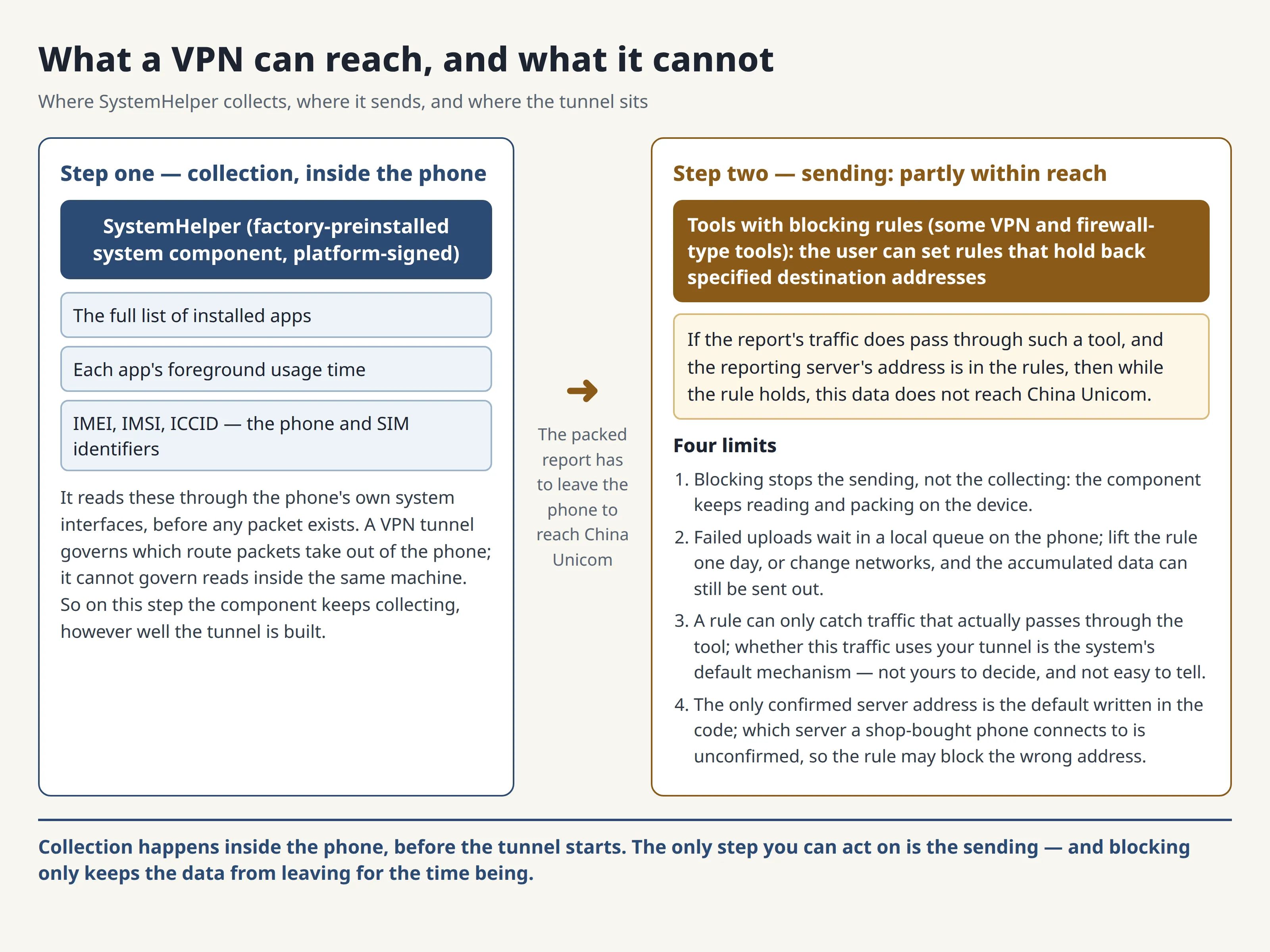
Ordinary apps are blocked from all three of these reads, but each one is blocked in a different way. For the phone and SIM identifiers, Android 10 is the cutoff: since that version, an ordinary app cannot read the IMEI, IMSI or ICCID, and only a preinstalled app holding the signature-level privileged permission can read them. Enumerating every installed app rests on a signature-level privileged permission as well. Usage time is different again, because an ordinary app can read it only when the user goes into settings and grants usage access by hand. A component that arrives preinstalled and platform-signed is blocked by none of the three, and that is exactly the problem.
Even if you look only at the sending step, the tunnel can still be bypassed. Android’s VPN mechanism itself allows per-app routing, and it allows an app to bind itself to a specific network and skip the tunnel entirely. Whether a system component’s traffic travels through your VPN is not for you, the user, to decide. It is the system’s own default mechanism: users generally cannot change it, and they cannot easily tell whether it happened in any particular case.
And even if this component’s traffic did go through your VPN, the tunnel itself changes only the source address that observers along the connection’s path see. But once the server receives the data and opens it, it is looking at the same record, carrying the same IMEI and SIM identifiers. Your source address changing has no effect on whether it can tell whose record this is.
The sending step, though, is not completely beyond reach. Once this data is packed up on the phone, it still has to be sent out before it can reach China Unicom. Some VPN and firewall-type tools let the user set blocking rules that hold back specified destination addresses. If this report’s traffic does pass through such a tool, and the user has put the reporting server’s address into the rules, then while the rule holds, this data does not reach China Unicom.
This route has a precondition: a blocking rule can only hold back traffic that does go through the tool, and whether this traffic travels through your tunnel, as the earlier paragraph said, is not for the user to decide and is not easy to tell. It also has a limit: what it holds back is the sending, not the collecting.
The component keeps reading on the device itself and keeps packing; data whose sending failed is stored on the phone first and waits to be sent again later, so if the rule is lifted one day, or the network environment changes, the accumulated data can still be sent out. There is also a difficulty before you even start: to block an address, you first have to know which address to block. The only address confirmed today is the default one written in the code; which server a phone bought in a shop connects to, nobody has confirmed, so even if you put the default address into the rules, you may not be holding back the server it really connects to.
What the assembled dataset shows
Look at the app list on its own first. It is a plain record of the owner’s interests. The list shows which bank’s app you installed, whether you installed a medical app or a dating app, and none of that requires opening any app and reading its content.
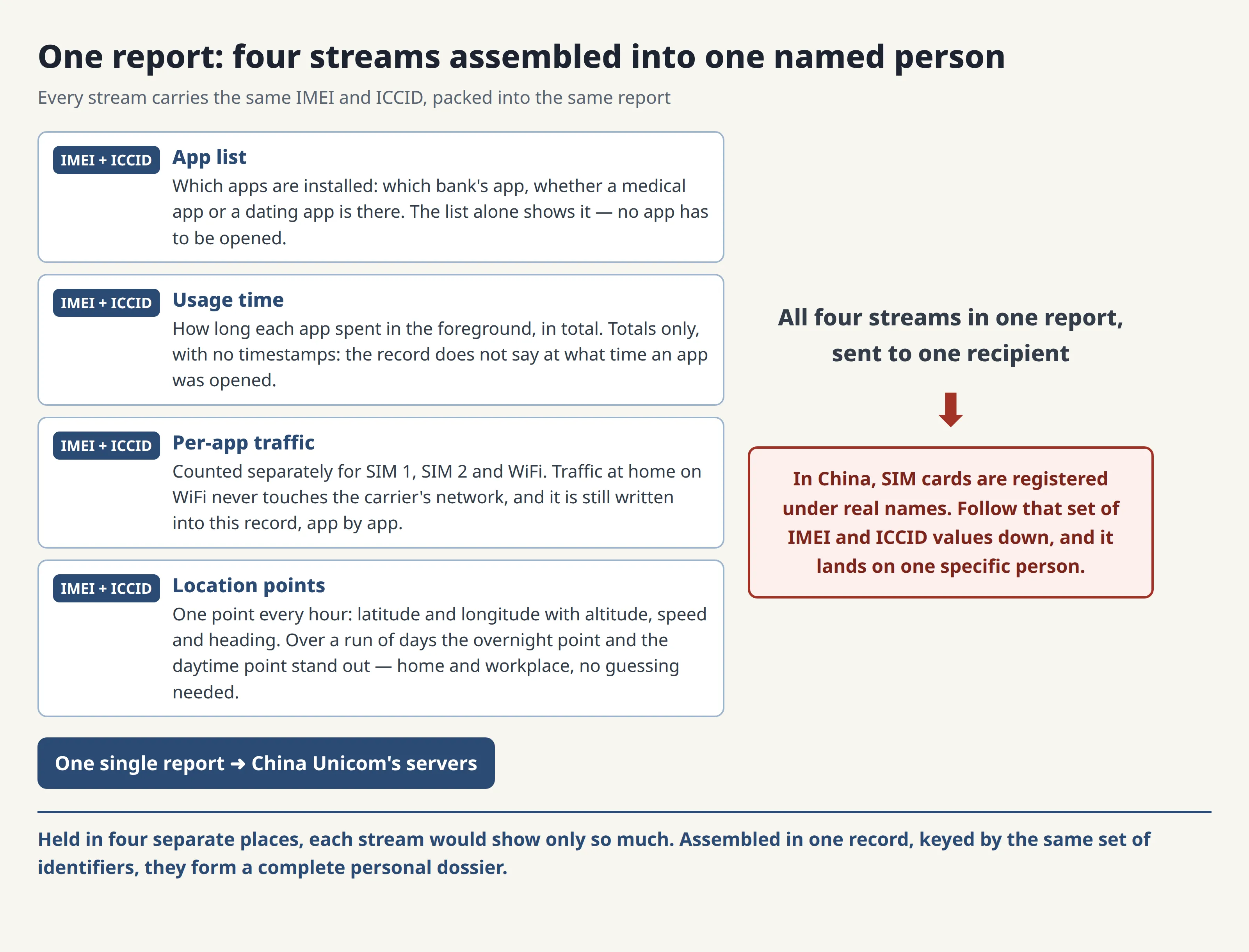
Add the usage totals, and they show which apps took up your time. Across the past 24 hours, the totals show which apps held the foreground longest and which ones you opened only briefly, so they show which services account for most of the usage time. But the totals carry no timestamps. The record does not say at what time you opened an app, so on its own it cannot say when you sleep or when you get up. The daily routine can be worked out from a different set of records, the location records.
Readers tend to underrate what the per-app traffic figures reveal. They are counted per app, and the WiFi traffic is counted separately. So even when you are at home on WiFi, where your traffic never touches the carrier’s network at all, the per-app WiFi totals are still written into this record.
Then location is added to the report. The report carries both cell identifiers and latitude-longitude coordinates. A cell locates the phone only within a rough area, while coordinates give the exact spot. And because the location collection runs on a one-hour cycle, the points accumulate hour by hour. Over a run of days, the points show a pattern the usage totals cannot show: the point the phone returns to at night and the point where it spends the day, and together those two points show where home and the workplace are. With speed and heading in the same records, the route travelled in between them can be reconstructed as well. The daily routine can be worked out from the location records, not from the usage totals.
If these four parts were held in four separate places, what anyone could learn about a person from them would stay limited. In this report, they arrive pre-assembled, because the apps, the usage time, the traffic and the location in the same batch of records all carry the same set of IMEI and ICCID values. In China, SIM cards are registered under real names, so those identifiers lead, through the real-name registration, to one specific person.
What your carrier already holds
Your own carrier already lawfully holds a great deal. It holds your real-name registration and the IMEI your phone presented when it joined the network, and it holds records of which cell towers you connected to. It also records where your traffic went and how much traffic there was. That data is inseparable from running a network and billing for it, in any country.
What is new here is the part a carrier can never see from the network side. It cannot see which apps you installed, and it cannot see how long each app spent on your screen. It cannot see your WiFi traffic, and GPS-grade coordinates are not in its hands either. On top of that, this whole assembled record is reported to China Unicom while the phone in question carried a China Mobile SIM. The party collecting it does not even have a contract with you.
The DM arrangement itself was not secretly invented by Xiaomi or China Unicom either. All three Chinese carriers require DM adaptation for the phone models they stock, which is why this component shows up across many brands sold in China. The adaptation branches in its code cover OPPO, vivo, Samsung and ZTE, among others. Huawei and Honor do not appear in that list.
Those statements about the other brands need one honest limit. So far, the only sample that has been fully dismantled, with its fields counted one by one, is Xiaomi’s. For the other brands, what is confirmed is that the component is present on them, and that it holds the same permissions. Nobody has publicly taken apart the other brands’ builds of the component yet, so whether they report the same way, with the same fields, is unknown, and conclusions drawn from the Xiaomi sample should not be applied to them unchanged.
Checking and removing it yourself
Check whether it is there first. Open the app management page in Settings, turn on “show system apps,” and search for SystemHelper. If it appears, it is installed. If you are comfortable with a computer, you can also list the package name with adb, or audit the whole device’s apps and permissions with the open-source tool NOIR, which needs no root.
If it is there and you want it gone, you can uninstall it for the current user with adb, again without root. Two caveats come first. This removal applies only to the current user, so a factory reset brings it back. Community-maintained debloat lists catalog preinstalled apps that can be removed. These lists warn that the component is tied to the phone’s dual-SIM functions, without saying what the tie consists of or what would break if it were removed. So after removing it, you should check that both SIM cards still call and connect properly. If anything breaks, a command exists to install it back exactly as it was.
Two popular remedies, however, do nothing. Turning off the consent switch in settings is one, because the code path for Xiaomi phones never reads that switch, as explained above. Turning on an ordinary VPN so the traffic takes a different route is the other. Rerouting changes only the source address, while the collecting and the packing are both completed on the device itself, so rerouting on its own does nothing. A tool with blocking rules does not count as this remedy: if you put the reporting server’s address into the blocking rules, then the data cannot get out for the time being, and its preconditions and limits are covered in the section above.
The questions nobody has answered
As of November 5, neither Xiaomi nor China Unicom had issued any public statement about this round of disclosures. How long this data is kept on Unicom’s side, who is allowed to query it, and what procedure a query requires: no public material answers any of that today.
One detail also remains unverified. Which server an ordinary phone bought in a shop connects to is stored in the component’s own configuration. That configuration cannot be read without root. The phones the researchers took apart were rooted ones. So the only address confirmed is the default one in the code. The auditor who dismantled the Redmi phone caught no actual upload traffic in his short observation window either, so the real reporting frequency has no settled answer yet.
What can be seen in transit is also unsettled. The default reporting address written into the code is plain HTTP, and the app is permitted to send cleartext traffic. At the same time, the payload body goes through application-layer encryption processing (AES and RSA) in the code before sending. A plaintext address does not by itself mean the body is sent unencrypted. No third party has published a decrypted capture of real traffic. Whether every reporting path receives the same processing has not been separately confirmed — and that includes /register, the registration path at the end of the reporting address. Nobody can say for sure who can see what in transit.
The phone call from the police that opened this piece belongs in this section too. All that is established is the order of events: the reporting was going on, and the call came after it. Whether the reporting triggered the call has no evidence chain behind it, only the timing and MeT’s friend’s own inference. This piece therefore treats the call only as the reason MeT started digging, and never as a proven consequence of the reporting.
If you use Telegram or proxy tools on your main phone, my advice is plain: spend ten minutes and check your own device first. If the component is there, then deal with it using the steps above. If you cannot deal with it for the time being, then first use a tool with blocking rules to hold back the reporting server’s address, so the data cannot get out for now. If even that is not possible, then move the sensitive apps to a second device. Do not let a component you cannot see keep recording, day after day, which apps you use and where you go.
I will keep taking system layers apart like this. If this was useful, consider subscribing to this blog or bookmarking it. More AI, security and open-source pieces, taken apart the same way, are on the way.
Sources: the V2EX thread “Can we have a little privacy” (https://www.v2ex.com/t/1254629 ); the independent audit at GitHub, LING71671/systemhelper-privapp-audit; the evidence compilation at beibing173/chinaphone; MeT’s (@MeTerminator666) original posts of October 31, 2026.